


Colour Correction vs Colour Grading: What’s the Difference & Which Do You Need?
- Jade Hallam
- Feb 2
- 4 min read
Confusing colour correction with colour grading is quite common, especially if you're new to the video editing world. Both of them are considered finishing touches that improve and elevate your video, however, they both have very different purposes. Throughout this blog, we will talk about colour correction vs colour grading, and describe each one, as both are essential steps in producing a polished, professional video.
What Is Colour Correction?
So, you may be wondering, what is colour correction? Well, colour correction is the technical process of fixing issues in your video footage in order to make it look natural and consistent. This can include various elements such as adjusting the exposure, white balance, contrast, and colour consistency across video clips.
The overall goal of colour correction is to make your video look a lot more accurate to the human eye, so that the colours appear as they should and the footage feels balanced.
With videos, there are a few common problems that editors have to correct when it comes to colour correction. For example, in nearly every clip, video editor Ollie Tristram explains that he has to adjust the white balance, shadows, midtones, highlights and saturation. However, the most common issue he has found is the skin tones, which can often appear too purple or orange, depending on the lighting conditions during filming.
Ollie typically uses Adobe Premiere’s Lumetri colour correction workflow, which allows him to layer adjustments in an organised order:
Basic correction (white balance, exposure, contrast)
Creative adjustments (optional tweaks to look natural)
Refinement (ensuring consistency across clips)
By following this workflow, colour correction becomes a structured and reliable step in the editing process.
What Is Colour Grading?
Colour grading is the creative process of applying a particular mood, style, or personality to your video. While colour correction ensures the footage you're using looks accurate and cohesive, colour grading transforms it into a visually striking final product. So, they both focus on changing the colours, but in different ways.
When it comes to choosing a colour grading style, it depends heavily on the type of video you're editing. Video editor Ollie explains:
Corporate videos: these usually require minimal grading. Clean and simple images are preferred.
Cinematic projects: these types of videos, such as documentaries, often benefit from creative grading using pre-made LUTs (Look Up Tables).
A LUT is a tool that applies a specific colour style to footage, which can then be adjusted to achieve the desired look. Ollie often uses pre-made LUTs as a starting point, refining them to suit the project, rather than creating one from scratch. This approach allows him to achieve professional, polished results much faster and more efficiently.
While most clients don’t request a specific look, some do share reference videos for inspiration. Like any part of the editing process, colour grading is refined through client feedback to ensure the final video meets their vision.
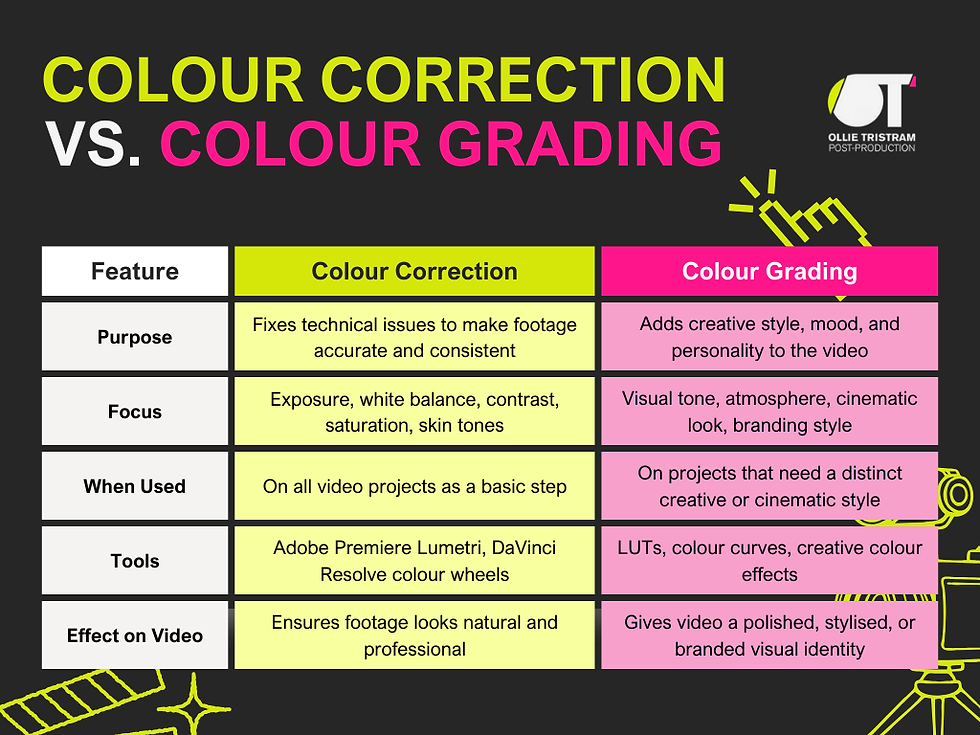
Colour Correction vs Colour Grading: The Key Differences
Here’s a simple way to remember the difference:
Colour correction = technical fix (making footage accurate and consistent)
Colour grading = creative look (adding style, mood, and visual identity)
Both processes work together to elevate a video. A video that has only been graded without proper correction may look stylised, but technical issues like uneven skin tones or inconsistent exposure will still be noticeable.
Ollie has documented both stages in a process video he created for a train project.
When Do You Need Each?
Colour correction only: Ideal for interviews or straightforward content where accuracy is key.
Colour grading: Best for branded, creative, or cinematic projects that benefit from a distinctive style.
Ollie notes that for projects requiring serious grading, he often switches from Premiere to DaVinci Resolve, which offers more advanced tools for video grading. However, most of his projects don’t require this step, and grading can often be achieved within Premiere using LUTs and minor adjustments.
Why It Matters to Colour Correct and Colour Grade
Colour directly impacts how the audience perceives the video they're watching, so even a small issue with the exposure or an inconsistent skin tone can make footage look off or amateurish, which distracts from the video's message. Colour correction ensures that every clip looks balanced, consistent, and natural, which creates a solid technical foundation for the video.
Colour grading is used to add the creative layer that provides personality and emotional impact to the video. This is done through adjusting tones, the colour palette, and the contrast. This type of work can evoke specific moods when done correctly, such as a bright, uplifting feel for a corporate video, or a dramatic and cinematic atmosphere for a documentary.
Professional colour work doesn't just make the video look better, it improves clarity and helps to guide viewers' attention, reinforcing brand identity and the video message. For example, a promotional video that is well-graded and consistent can make your company appear more professional and trustworthy, while a creatively graded cinematic sequence can make storytelling much more memorable and engaging.
As Ollie notes, even projects that seem simple can benefit from colour adjustments. In his EMR train video, careful grading turned standard footage into a visually striking final product, showing how impactful the right finishing touches can be.
Conclusion
In short, colour correction fixes technical issues and colour grading enhances style and mood.
Both steps are crucial for professional video production. If you skip colour correction, even the best grading won’t hide technical problems. Colour grading is the step that adds creative flair, giving your video its final, polished look.
As Ollie advises:
“Colour correction is essential for all video content, no matter the budget. Colour grading adds an extra touch of style, but it’s the correction step that ensures your footage is consistently professional.”
If you’re interested in professional colour correction and colour grading services, make sure to contact Ollie Tristram.


Comments